How to make slides or a PowerPoint automatically
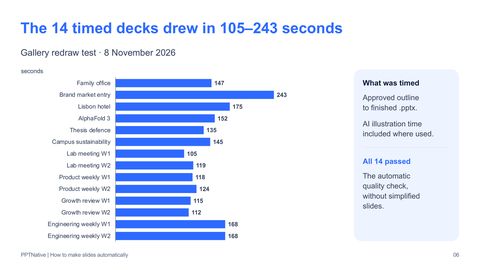
A 13-slide guide in PPTNative's own light brand look: the main ways to make slides automatically, a checklist for any tool, and how PPTNative works, with a native chart of how long 14 gallery decks took to draw (105–243 seconds each) and four real screenshots, credited.
A five-page brief (PDF) we wrote: the guide's content, the draw times of 14 gallery decks and four screenshots of PPTNative output. After the outline, we set the colours and fonts to PPTNative's light brand look.
With these instructionsA 13-slide guide that answers the question 'How do I make slides or a PowerPoint automatically?' for professionals and students who make decks every week, then shows how PPTNative does it, using the proof in the brief. Audience: people deciding how to make their next deck. Tone: helpful and concrete, not salesy; let the evidence sell. Keep what the brief says about other tools general and exactly as fair as the brief; never claim more about them. Include: the main ways (one slide), the six-point checklist (one slide), the three steps as an editable diagram, a native bar chart of the 14 draw times from the table (seconds, one bar per deck, short labels), and the four figures where they fit, each credited as in the brief. Do not invent numbers or statistics beyond the brief. Close with how to start free at pptnative.com. Footer: PPTNative | How to make slides automatically. Speaker notes: talking points a presenter can say, with the reason behind each slide.
Finished by handPPTNative drew this deck in about 3 minutes from an approved outline. We then made small changes by hand: the two section numbers became 01 and 02, and in PowerPoint we widened the titles on slides 1 and 11 and narrowed the band behind slide 13. The second download is the deck before the PowerPoint changes.
Free to download, no sign-in needed. Open it in PowerPoint and change anything.

- Look
- Soft Rounded
- Deck type
- Consulting Decision
- Images
- AI illustrations
- Slides
- 13
- Deck language
- English
Every slide, unedited
Click a slide to see it large.
-
1How to make slides or a PowerPoint automatically
Speaker notes
If you make a deck every week, the goal is not just to generate slides—it is to turn material you already have into a clear story that you can still revise. The work often lies in organizing that story, carrying the numbers across correctly, and updating charts when the data changes. We'll compare the main routes, establish what to check in the finished file, and then walk through PPTNative's approach.
-
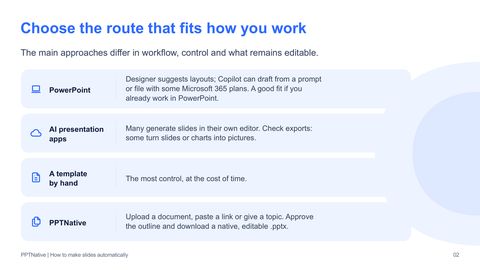
2Choose the route that fits how you work
Speaker notes
With that goal in mind, choose the route around how you already work and what you need to edit afterward. PowerPoint's Designer suggests layouts, while Copilot can draft from a prompt or file with some Microsoft 365 plans. Many AI presentation apps generate in their own editors, so check their PowerPoint exports: some turn slides or charts into pictures. A template filled by hand gives you the most control at the cost of time; PPTNative instead takes your material through an outline review before producing a native, editable PowerPoint file.
-
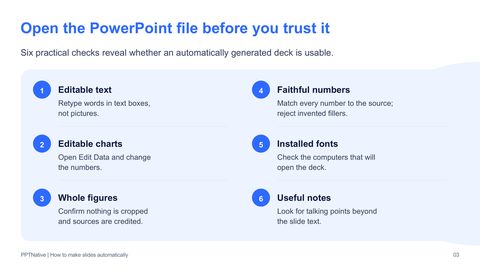
3Open the PowerPoint file before you trust it
Speaker notes
Those differences become concrete when you open the exported file and try to change it. Retype some text and open a chart's data sheet to establish whether you have editable objects rather than pictures. Then check that source figures are complete and credited, and match every number against the source rather than accepting plausible filler. Check the fonts on the computers that will open the deck, and read the notes to see whether they help you explain the content instead of merely repeating it.
-

4Review the story before the slides are drawn
Speaker notes
That checklist tests the finished deck, but the story deserves a check before production begins. PPTNative separates outline review from drawing the slides, and making or editing that outline costs nothing.
-
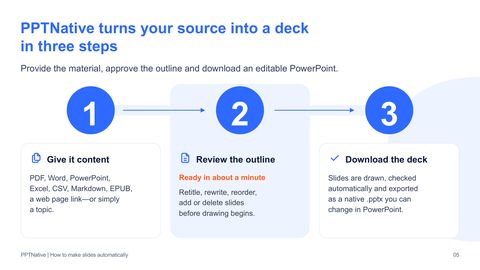
5PPTNative turns your source into a deck in three steps
Speaker notes
That separation gives you a place to decide what the presentation should say before generating the PowerPoint. Start with existing material—a document, spreadsheet, presentation, web page, or another supported source—or simply provide a topic. In about a minute, you get an outline where you can change titles and wording, reorder the story, or add and remove slides. Once you approve it, PPTNative draws the slides, runs an automatic quality check, and exports a native .pptx for further editing in PowerPoint.
-
6The 14 timed decks drew in 105–243 seconds
Speaker notes
The drawing stage has a measured example behind it, with a clearly defined start and finish. In the November 8, 2026 gallery redraw test, the 14 decks took between 105 and 243 seconds from approved outline to finished PowerPoint: the first lab meeting deck was the fastest, and the brand market entry deck was the slowest. Those times include AI illustration generation where used, but not the earlier work of preparing sources or reviewing the outline. All 14 passed the automatic quality check without simplified slides, so this is evidence of drawing time for those decks, not a promise about every future deck.
-

7The output must still work when things change
Speaker notes
Those timings address production speed; the next question is what happens when the content changes. Judge the file you will actually revise and reuse, not just the initial preview.
-
8Changing chart data redraws the bar and its label
Speaker notes
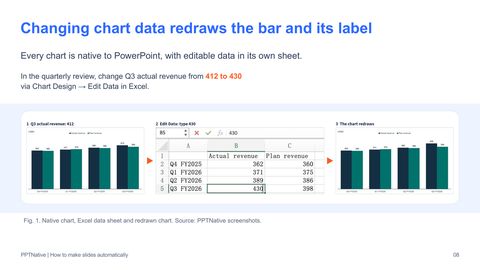
A direct way to test that is to change a number inside a generated chart. In the quarterly review example, opening Chart Design and then Edit Data in Excel lets you change Q3 actual revenue from 412 to 430, which redraws both the bar and its label. PPTNative's charts are native PowerPoint charts with their own editable data sheets, so this update happens through the chart's data rather than by manually reconstructing it.
-
9Source figures stay whole and credited
Speaker notes
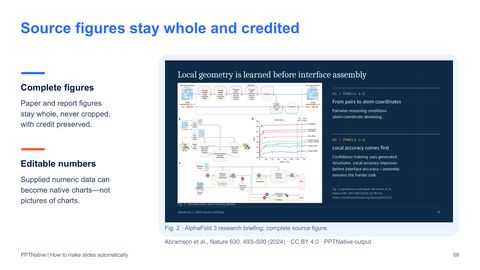
Editable charts address changing numbers, but research figures need a different kind of fidelity. PPTNative preserves paper and report figures whole and keeps their credit, while supplied numeric data can become native charts. The AlphaFold 3 briefing provides a concrete example: it retains a complete source figure from Abramson and colleagues in Nature, with the CC BY 4.0 attribution. The distinction matters because preserving a published figure and making supplied numbers editable are two different jobs.
-
10Choose a look for the audience—or reuse your own
Speaker notes
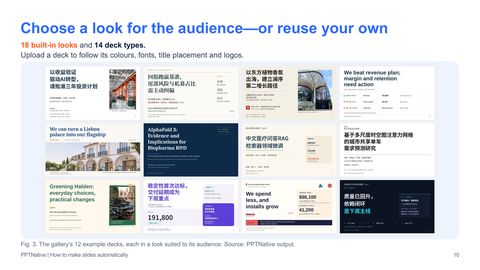
Once the evidence is handled appropriately, the presentation also needs to suit its audience. PPTNative offers 18 built-in looks and 14 deck types, with gallery examples ranging from board-oriented material to lab meetings. If you already have an established presentation style, you can upload a deck for PPTNative to follow rather than choose a new look. That gives you a choice between adopting a built-in style and continuing one you already use.
-
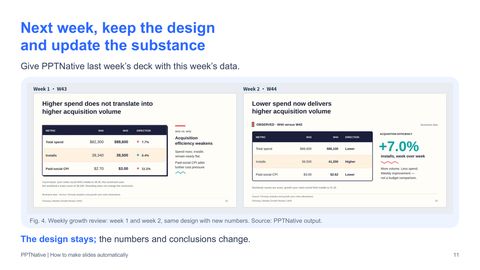
11Next week, keep the design and update the substance
Speaker notes
Continuing an existing style is especially useful when the same presentation comes around every week. Give PPTNative last week's deck along with this week's data, and the design can stay while the numbers and conclusions change. The weekly growth review example demonstrates that continuity across two weeks. The important review is still substantive: check that the new conclusions reflect the new data, not just that the deck feels familiar.
-

12Notes and language support help you deliver the deck
Speaker notes
Keeping the recurring deck current is only part of being ready to present it; you also need to know what to say. PPTNative can write source-grounded guidance into PowerPoint's notes using the deck and its source, and that feature is available with paid credits. It also supports decks in English or Chinese from sources in either language, so the source language does not have to determine the presentation language. Treat the notes as delivery support and review them alongside the slides.
-
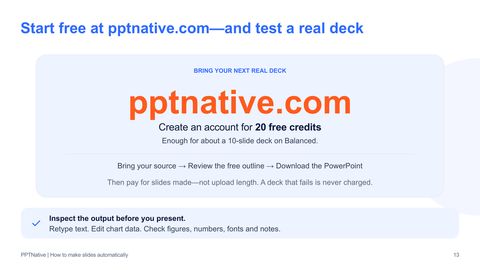
13Start free at pptnative.com—and test a real deck
Speaker notes
The practical next step is to try this workflow on material you actually need to present. A new account at pptnative.com includes 20 free credits, enough for about a 10-slide deck on Balanced, and outline creation and editing are free. After that, charges are based on slides made rather than upload length, and a failed deck is never charged. Before presenting, open the PowerPoint and apply the checklist: edit the text and chart data, then verify figures, numbers, fonts, and notes. Choose the method that gives you a faithful deck you can keep working with—not merely a fast first draft.


What you can change in the file
Every word is real text
Titles, bullets and labels are text boxes. Retype them, restyle them or translate them.
Diagrams are shapes
Boxes, arrows and icons are PowerPoint shapes you can move, resize and recolour.
Pictures stay separate
Photos and illustrations are their own images, so you can swap or crop them.
Charts are real charts
Each chart keeps its numbers in its own Excel sheet. Choose Edit Data, type new figures and the chart redraws.
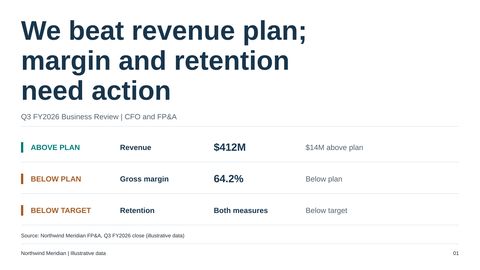 Quarterly business review: performance, drivers and decisions
 Luxury hospitality: a flagship hotel investment proposal
 AlphaFold 3: a research briefing for biopharma R&D leaders
Make your next deck in minutes, then make it yours.
Start with 20 free credits. No card needed.
Start free