Fintech app launch keynote
A launch keynote made from a three-page PDF brief: four new features with one customer moment each, beta results and targets as native charts, a plain trust-and-safety slide, pricing and rollout, and a speaker script split between the CEO and the head of product. Abstract AI illustrations in the glass look. Fictional company and data.
A three-page launch brief (PDF) with company metrics, beta results, the four features, pricing and rollout. Fictional company and figures.
With these instructionsThe Sorrel 3.0 launch keynote on 2 December 2026, presented by Amara Okafor (CEO) and Daniel Reyes (Head of Product) to press, partners and early users. Write in the presenters' voice, making the case for the launch, not as an outside reviewer questioning the brief. Follow the order the brief suggests for the keynote: the problem, Sorrel today, the four new features with one customer moment each, the beta evidence, trust and safety, pricing, rollout and targets, and a closing invitation to try it on 2 December. Show the beta results and the targets as native, editable charts. Illustrations should be abstract: soft gradient light, glass shapes, floating cards and coins, with no text, no app screens and no logos. All names and figures are fictional: label data slides Illustrative data, with source lines 'Source: Sorrel product analytics and beta programme, October 2026 (illustrative)'. Speaker notes should be the keynote script, split between Amara and Daniel.
Free to download, no sign-in needed. Open it in PowerPoint and change anything.

- Look
- Glassmorphism
- Deck type
- Product Launch
- Images
- AI illustrations
- Slides
- 12
- Deck language
- English
Every slide, unedited
Click a slide to see it large.
-

1You can track every pound and still wonder where it went
Speaker notes
Amara: Welcome, everyone, and thank you for joining us here in London. Being able to account for every pound doesn’t necessarily tell you why a month felt expensive, or what you can comfortably do next. Our beta users told us their biggest problem wasn’t tracking their money—it was understanding it. That’s the step we’re taking with Sorrel 3.0: explanations grounded in your spending, help anticipating bills, and support for saving, while you stay in control.
-

2We start with your money, not generic advice
Speaker notes
Amara: To make that understanding useful, we have to start with your actual financial life: connected accounts, categorized transactions, and a clear safe-to-spend number—the foundation behind our October registered-user count of 1,420,000, reported here as illustrative data. Our bank connection is read-only through Tessel Connect; Sorrel isn’t a bank and doesn’t hold your money, and Daniel will now take you through what we’re building on that foundation.
-
3Ask why October was expensive—and see what the answer uses
Speaker notes
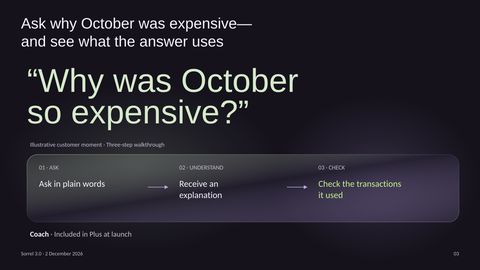
Daniel: That foundation lets you ask a question about your own spending rather than search for advice that might not fit. Imagine October has felt unusually expensive: you ask Coach why, get an explanation built from your transactions, and can inspect the transactions behind it. In the beta, 58% of users asked Coach at least one question each week. We also audited 1,000 randomly chosen answers: 94.2% were correct, 4.1% partly correct, and 1.7% wrong; the wrong answers were traced to miscategorized transactions, and those fixes are in the launch build. That’s why making the evidence checkable matters, rather than asking you to accept an answer on trust.
-
4See a bill coming before it reaches your account
Speaker notes
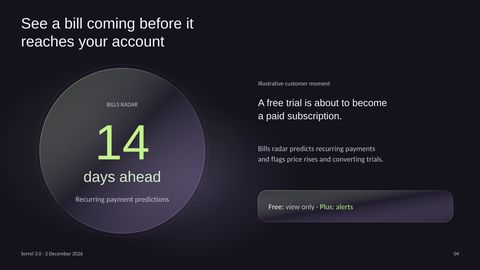
Daniel: Understanding last month is useful, but it’s just as important to see what’s coming next. Imagine a free trial you signed up for is about to turn into a paid subscription: Bills radar flags that conversion, alongside recurring payments and price rises, with recurring-payment predictions 14 days ahead. In the beta, 23% of users canceled at least one subscription they no longer used; among those users, the median saving was £14.20 a month. You can view Bills radar on Free, while Plus adds alerts.
-
5Build a savings habit without handing over control
Speaker notes
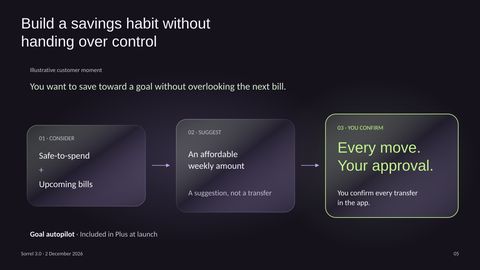
Daniel: Once you can see the next bill coming, you have a better basis for deciding what to save. Imagine you’re working toward a goal but don’t want to overlook a payment that’s due: Goal autopilot considers both your safe-to-spend amount and upcoming bills before suggesting a weekly savings amount. The important distinction is that it makes a suggestion, not a transfer. You confirm every move in the app, so help building a habit never means handing over control.
-
6Share the household goal, not your whole financial life
Speaker notes
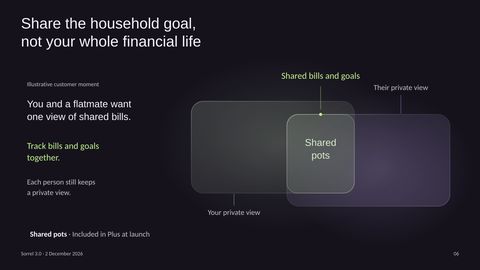
Daniel: That same principle applies when a financial goal involves someone else: working together shouldn’t mean giving up your private view. Imagine you and a flatmate want one place to track shared bills and a goal you’re saving toward together. Shared pots gives you that shared view while each of you keeps a private one. This has been our most requested feature since 2023, with 8,900 votes on our feedback board—a clear reason to make household coordination part of this release.
-
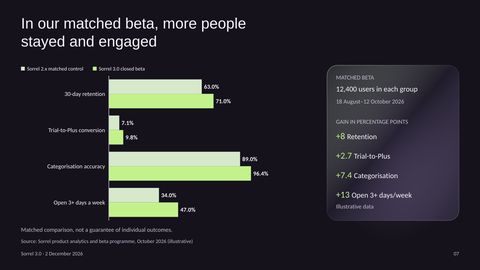
7In our matched beta, more people stayed and engaged
Speaker notes
Daniel: Those individual experiences matter, and we also wanted to understand how the release performed as a whole. Our illustrative beta results compare 12,400 existing users on 3.0 with 12,400 matched users on Sorrel 2.x over the same period, August 18 through October 12. Thirty-day retention rose from 63% to 71%, and the share opening Sorrel at least three days a week rose from 34% to 47%—gains of eight and 13 percentage points. Trial-to-Plus conversion increased from 7.1% to 9.8%, while categorization accuracy improved from 89% to 96.4%. All four measures moved in the right direction in this matched comparison; that’s encouraging evidence, not a guarantee of any individual outcome.
-

8Your money moves only when you say so
Speaker notes
Amara: Those results are encouraging, but they don’t change our boundary: Coach explains, Goal autopilot suggests, and every transfer requires your approval. Bank access stays read-only and you can disconnect a bank in two taps; customer data is never used to train AI models, Coach runs on our own infrastructure with data encrypted at rest and in transit, and it offers explanations and impartial guidance—not investment advice.
-
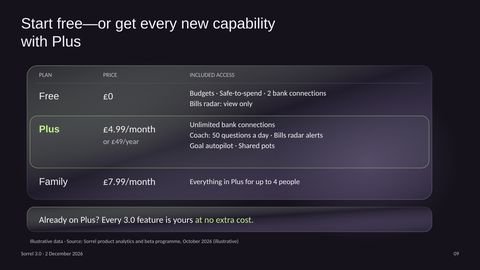
9Start free—or get every new capability with Plus
Speaker notes
Amara: With those boundaries clear, the choice is how much support you want from Sorrel. Free keeps the budgeting foundation, safe-to-spend, two bank connections, and a view of Bills radar. Plus is £4.99 a month or £49 a year, adding unlimited connections, up to 50 Coach questions a day, Bills radar alerts, Goal autopilot, and Shared pots. Family is £7.99 a month for everything in Plus for up to four people. If you already subscribe to Plus, every 3.0 feature is included at no extra cost.
-

10We launch in the UK today, with more markets planned
Speaker notes
Amara: Those choices are available in the UK today, December 2, on iOS and Android. Beyond the UK, we’re planning Ireland for February 2027 and the Netherlands for the second quarter of 2027, with the Netherlands rollout subject to Tessel Connect bank coverage.
-
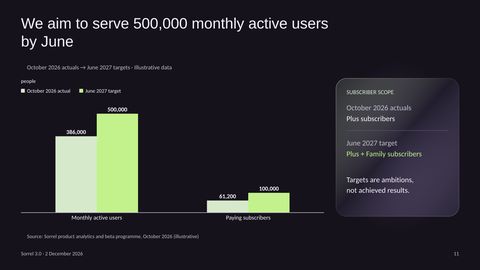
11We aim to serve 500,000 monthly active users by June
Speaker notes
Amara: That rollout supports our next ambition, and it’s important to distinguish where we are from where we want to be. In our illustrative October 2026 actuals, we had 386,000 monthly active users; our June 2027 target is 500,000. We also aim to grow from 61,200 paying Plus subscribers in October to 100,000 paying subscribers across Plus and Family by June, so the subscriber scope expands with the new plan. These are targets, not achieved results: our task now is to earn that growth by helping people understand and use their money.
-
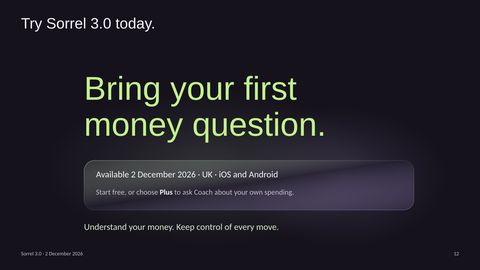
12Try Sorrel 3.0 today. Bring your first money question.
Speaker notes
Amara: Earning that growth starts with the first question you bring to Sorrel. If you’re in the UK, you can try Sorrel 3.0 today on iOS or Android—start free, or choose Plus to ask Coach about your own spending. Thank you to our early users, partners, and everyone joining us for this launch. We’re here to help you understand your money, while every move remains yours to approve.


What you can change in the file
Every word is real text
Titles, bullets and labels are text boxes. Retype them, restyle them or translate them.
Diagrams are shapes
Boxes, arrows and icons are PowerPoint shapes you can move, resize and recolour.
Pictures stay separate
Photos and illustrations are their own images, so you can swap or crop them.
Charts are real charts
Each chart keeps its numbers in its own Excel sheet. Choose Edit Data, type new figures and the chart redraws.
 How to make slides or a PowerPoint automatically
 Quarterly business review: performance, drivers and decisions
 Luxury hospitality: a flagship hotel investment proposal
Make your next deck in minutes, then make it yours.
Start with 20 free credits. No card needed.
Start free